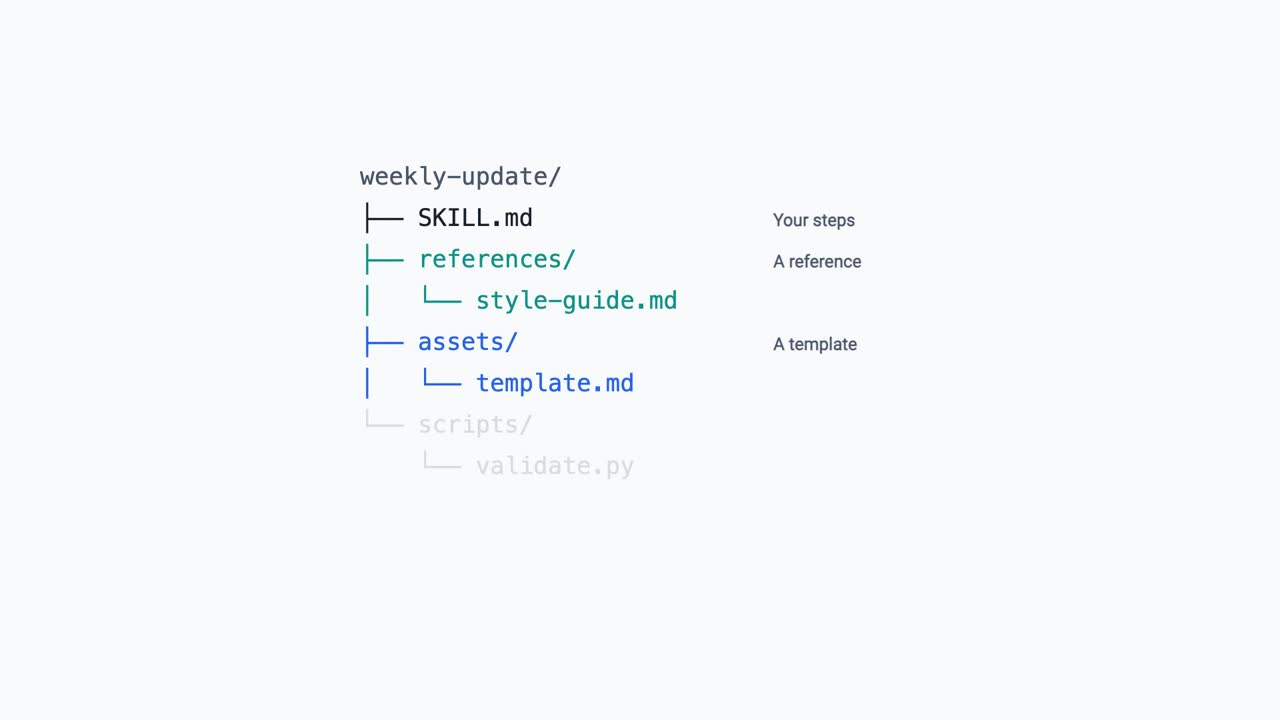
This one follows Skills explained and goes a layer down. A skill is a folder, so it can hold far more than a list of steps: a reference to check against, a template to copy, and a script that does part of the job the same way every time.
None of it sits in the conversation. The folder stays on disk and nothing is read until something calls for it, which is why a skill can carry more material than you could ever paste into a chat. Scripts are the part worth understanding: instructions get interpreted, code does not, and only the result comes back.
It also covers the mistake that stops a skill loading, and the security point that matters most. A skill can carry code that runs with the access you have already given, so treat one like software you are installing rather than a message you are sending.
Checked in September 2026. This is an independent explainer, not affiliated with Anthropic.
Transcript
Your skill has the steps in it, but the AI still gets the shape wrong, so you paste in the template again, and the example, and the rules you forgot last time. All of that could be living inside the skill.
Open a skill up and it is a folder. Your instructions sit in one file. Next to them you can put a reference to check against, a template to copy, and a script that does a job the same way every time.
So when a skill carries a fifty page style guide, how much of it does the AI actually read?
Only the part it needs. The folder sits on disk rather than in the conversation, and nothing is read until something calls for it. That is why a skill can carry far more than you could ever paste into a chat.
Instructions can be interpreted. A script cannot. So when part of the job has exactly one right way of being done, put the code in the folder and let the AI run it. Only the result comes back, which means the code never fills up the conversation, and the job comes out the same way every single time.
Getting it in is the same panel from the first video, with one more button. You add your files, and the whole folder becomes a zip that you upload. One thing trips people up here, and it is that the skill folder has to sit at the top of that zip rather than buried a level down.
And if you would rather not write any of it, Claude on the Mac can watch you do the task once and build the skill out of what it saw. You read it afterwards and fix anything it misunderstood.
Now the part worth saying plainly. A skill can carry code, and that code runs with whatever access you have already given the AI. So treat one like software you are installing, not a message you are sending. Anthropic's own guidance is to use skills from sources you trust, and to read what is in the folder before you run it.
Not everything deserves a skill. If you are only going to do it once, a prompt is enough. If you are going to do it every week, and you want it the same every week, that is when the folder earns its place.
So what does packaging buy you? Everything the job needs travels with the steps, and none of it costs you a thing until the moment it is used.